
What Is the Standard Height of a Work Desk: Ergonomic Guide for 2026
Wondering what is the standard height of a work desk? Explore ergonomic dimensions, seated formulas, and adjustable workstation setups for November 2026.
 By Arriana Vasquez
Updated November 6, 2026

Setting up a functional workspace often begins with adjusting your chair, yet your work surface plays an equally decisive role in maintaining physical comfort throughout the day. When wrist angles collapse or shoulders hike up toward your ears, the root problem frequently stems from an incorrect surface elevation. Understanding what is the standard height of a work desk provides an essential baseline for diagnosing poor posture and eliminating repetitive strain in your arms, neck, and lower back. Most traditional furniture lines follow historical design conventions, but modern ergonomics emphasizes that one fixed dimension rarely fits every body type.
A typical fixed desktop sits around 28 to 30 inches off the floor, which accommodates an average adult male around five feet ten inches tall but often causes discomfort for everyone else. Remote professionals who spend extended hours typing must carefully balance their physical measurements against their furniture to protect joint mobility. When selecting an appropriate home office desk, knowing whether a fixed surface or an electric sit-stand frame matches your reach will determine your daily energy levels. Evaluating your seated elbow height alongside supportive accessories ensures your workstation supports your spine rather than working against it.
| Award | Product | HOF Score About HOF ScoreThe HOF Score is our own rating from 0 to 10, based on performance, design and build, ease of use, and value. It reflects independent research and is never influenced by manufacturers, retailers, or affiliate commissions. Learn more › | |
|---|---|---|---|
| Best Overall |
 Veken 63"x28" Wider Large Standing Desk |
8.6/10 | Buy |
| Best Budget |
 Amazon Basics Electric Standing Desk |
8.4/10 | Buy |
| Best Value |
 Huuger 55 x 28 Large Electric Standing Desk |
8.1/10 | Buy |
| Best Premium |
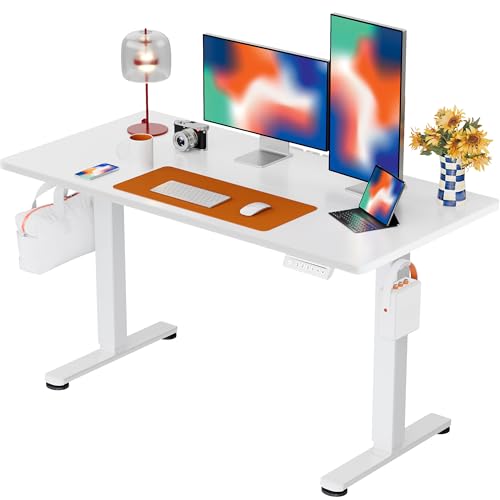 ErGear Height Adjustable Electric Standing Desk |
8.1/10 | Buy |
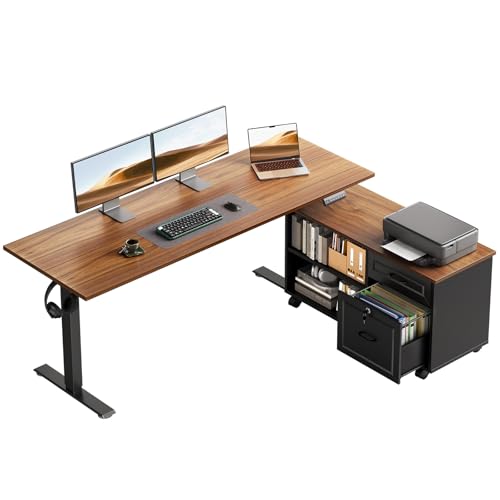 OffiGo 55" L Shaped Electric Standing Desk |
8.1/10 | Buy | |
 ComfiLife Foot Rest for Under Desk at Work |
7.8/10 | Buy |
Ergonomic Workstation Dimensions and Desk Height Mechanics
Fixed office desks standardly measure 28 to 30 inches from the floor to the top of the working surface, with 29 inches representing the most widespread industry average. This universal measurement was established decades ago based on the physical proportions of average adult males, creating a compromise for commercial furniture manufacturing. While a 29-inch elevation feels acceptable for a narrow slice of the workforce, it imposes unnecessary physical stress on individuals whose body proportions fall outside that statistical window. Learning how desk height impacts seated joint alignment and standing mobility is essential for creating a comfortable, fatigue-free workspace.
The Historical Origin of the 29-Inch Fixed Workstation
Standard desk dimensions originated during the mid-twentieth century when commercial offices expanded across corporate centers. Furniture manufacturers needed a single, cost-effective dimension that could be mass-produced for large administrative typing pools without custom fitting. Designers settled on 29 inches because it accommodated a seated five-foot-ten-inch male wearing dress shoes without his knees hitting the underside of the desk frame. Unfortunately, this rigid dimension failed to anticipate the needs of shorter workers, taller employees, or the intensive physical demands of modern computer tasks.
Typing on a computer keyboard requires an entirely different arm posture than handwriting on paper or reviewing ledger sheets. When writing with a pen, resting forearms on a slightly higher surface provides helpful physical stability. In contrast, modern keyboard and mouse inputs demand a relaxed shoulder posture with elbows bent at ninety degrees to prevent forearm tendon compression. Working on a fixed 29-inch surface forces shorter individuals to shrug their shoulders constantly, leading to chronic tension across the trapezius muscles and cervical spine.
Calculating Your Personal Ergonomic Seated Desk Height
Determining your ideal seated desk elevation requires measuring your body directly rather than relying on arbitrary furniture standards. Begin by adjusting your office chair so your feet rest flat on the floor with your knees bent at a ninety-degree angle. Your thighs should sit parallel to the ground with a small gap between the front edge of the seat cushion and the back of your knees. Once your lower body is positioned correctly, let your shoulders drop naturally while bending your elbows at a ninety to one-hundred-degree angle.
Measure the vertical distance from the floor to the underside of your forearms to discover your true ergonomic working plane. For an adult measuring five feet four inches tall, this ideal working plane often rests between 23 and 25 inches from the floor. For someone standing six feet tall, the correct seated elbow plane typically hovers around 27 to 28 inches. Placing your keyboard on a standard 30-inch surface when your natural elbow height is 24 inches creates a substantial postural mismatch that strains your upper body over time.
Standing Desk Elevation Ranges for Proper Upright Posture
Transitioning to an upright standing posture requires a fresh set of ergonomic measurements because spinal alignment changes when you are on your feet. When standing, your baseline working plane is measured from the floor to the underside of your bent elbows while keeping your core engaged and head upright. Your forearms should rest parallel to the desktop surface, allowing your hands to rest naturally on the keys without bending your wrists upward or downward. Keeping your elbows tucked close to your torso minimizes fatigue in the upper back and neck muscles.
Motorized sit-stand desks address this need by providing wide travel strokes that adapt to varying user heights. Many popular electric models, such as those from Veken, Huuger, or ErGear, offer vertical adjustment ranges spanning roughly 28 inches up to 46.5 or 47.2 inches. A maximum height near 47 inches comfortably accommodates users up to six feet two inches tall while standing upright. Factoring in footwear thickness and dense anti-fatigue floor mats ensures you achieve neutral elbow alignment without slouching forward during standing intervals.
Ergonomic Standards: ANSI/BIFMA G1-2017 Guidelines
The Business and Institutional Furniture Manufacturers Association establishes rigorous benchmarks to guide ergonomic furniture manufacturing. The ANSI/BIFMA G1-2017 guideline outlines dimensional ranges necessary to accommodate the fifth percentile female through the ninety-fifth percentile male seated and standing workforce. To satisfy these comprehensive requirements, a desk must adjust continuously from 22.6 inches up to 48.7 inches. This broad travel span guarantees that shorter individuals can sit comfortably while taller professionals can stand without hunching over their screens.
Most entry-level electric desks utilize two-stage telescoping leg columns that cannot reach the lowest BIFMA threshold. Because two-stage columns rely on two nested metal tubes, the physical housing limits the lowest possible retraction to roughly 28 inches. In contrast, three-stage columns incorporate three nested segments, allowing the lifting column to collapse down to 22 inches while extending higher for tall users. Exploring affordable electric standing workstations provides viable paths to acquiring capable motorized frames that support diverse household statures.
Using Footrests to Bridge the Fixed Desk Gap
When your workstation features a fixed 29-inch desktop or a motorized frame that bottoms out at 28 inches, shorter workers face an immediate ergonomic puzzle. Lowering your chair to plant your feet on the floor forces you to reach upward toward the high desk surface, elevating your shoulders. Raising your chair allows your elbows to form a neutral ninety-degree angle with the tabletop, but it leaves your legs dangling uncomfortably in midair. Dangling feet compress the soft tissue behind the thighs, restricting blood circulation and causing lower back pain.
An ergonomic footrest offers the practical solution needed to bridge this dimensional mismatch. By elevating the floor beneath your desk, a firm foot cushion provides solid lower-body support while your chair stays raised at the necessary elbow height. Options like the ComfiLife Foot Rest utilize high-density memory foam to relieve pressure along the hips, knees, and ankles. Resting your feet securely against a stable cushion stabilizes your pelvis, promoting upright spinal alignment during long sedentary sessions.
Monitor Placement, Viewing Angles, and Eye-Level Alignment
Establishing proper desk height is only half the battle, as your computer screen elevation dictates how your neck and head align. Many workers place laptops directly on their work surface, forcing their neck into a severe forward bend of thirty degrees or more. The human head weighs roughly ten to twelve pounds in a neutral position, but tilting it forward increases the cervical load to forty pounds or more. To protect your spinal discs, the top third of your display screen should sit directly at eye level when looking straight ahead.
Desktop surface depth directly influences your monitor viewing distance and overall posture. Compact desks with depths of 24 inches, such as standard entry-level layouts, can leave large displays sitting uncomfortably close to your eyes. Deeper desktops measuring 27.6 to 28 inches deep, like those found on Huuger or Veken models, provide generous room to push monitors back to an optimal viewing distance of 20 to 30 inches. Combining proper desk depth with an adjustable monitor arm lets you raise the screen independently from your keyboard elevation.
Workstation Architecture: Weight Balance, Storage, and Layouts
Selecting the right desk layout involves balancing overall surface area against stability and room dimensions. Standard rectangular desks offer efficient footprints, but complex setups often require expanded configurations such as L-shaped executive frames. Desks like the OffiGo 55-inch L-shaped electric workstation integrate matching mobile cabinet sets, giving users dedicated filing space alongside primary computer peripherals. Distributing hardware across wider desktop zones prevents excessive localized weight that could tilt the desk frame or overwork motor gearboxes.
Lifting column architecture plays a critical role in preserving stability when a desk rises to its maximum height. Dual-beam steel frames and reinforced T-shaped leg designs help disperse lateral vibration, keeping computer screens steady while typing. Cable management also becomes an essential safety consideration whenever your desk moves across a vertical height range. Power cords and display leads must have adequate slack loops to prevent tension spikes that could rip plugs out of wall outlets during upward elevation.
Building a Sustainable Sit-Stand Routine
Investing in a height-adjustable workstation yields physical benefits only when paired with consistent postural movement throughout the working day. Many professionals mistakenly assume that standing continuously for eight hours is the ideal antidote to sedentary desk jobs. In reality, prolonged static standing can cause foot fatigue, varicose veins, and joint stiffness in the lower back just like prolonged sitting. Adopting a structured transition schedule trains your muscles to tolerate vertical loading without triggering musculoskeletal exhaustion.
Ergonomic researchers frequently recommend following the 20-8-2 routine to structure an active workday. Under this approach, you spend twenty minutes sitting in a neutral ergonomic posture, followed by eight minutes of standing work, and two minutes of walking or gentle stretching. This cadence keeps blood circulating through your calves and prevents spinal discs from remaining compressed under static loads. Discovering how active workstation benefits support cardiovascular and muscular vitality can help you stick to these daily movement habits.
Practical Setup Checklist and Long-Term Workstation Maintenance
Verifying your ergonomic setup after completing assembly ensures your workstation functions smoothly without unintended mechanical friction. Place a bubble level across both the front and rear edges of your desktop surface to confirm that the frame glides sit evenly on your floor. Uneven floorboards or plush carpet can create subtle frame imbalances that cause motor binding or accelerated column wear during height transit. Adjusting the threaded foot pads beneath each leg column eliminates unwanted rocking and stabilizes the desk across its entire travel stroke.
Routine mechanical inspection preserves lifting performance and keeps motor noise at minimal operating levels over years of daily service. Check the tightness of structural frame bolts and crossbeam connectors every six months, as normal vertical cycling can gradually loosen assembly hardware. Wipe telescoping column leg tubes with a dry microfiber cloth to remove dust buildup that could otherwise degrade internal glide pads. Maintaining a calibrated, level workspace guarantees that your chosen desk height continues to protect your posture and support productive daily routines.
About the author
Arriana Vasquez is a product writer specializing in work-from-home equipment and practical workspace solutions. Her reporting covers office chairs, standing desks, and technology designed for modern home offices. Through product research, testing, and detailed buying guides, she explores the features that influence everyday usability, comfort, and functionality. Her work helps readers compare workspace equipment and identify products suited to different working environments.