
What Is the Typical Height of a Desk: Practical Ergonomic Guide for 2026
Learn what is the typical height of a desk, calculate your personal ergonomic setup, and find the right adjustable workstation for November 2026.
 By Camryn Rabideau
Updated November 6, 2026

Working at a desk that sits at an improper level frequently causes lingering upper back stiffness, neck strain, and persistent wrist discomfort. Most professionals rarely consider their furniture elevation until chronic musculoskeletal fatigue disrupts their daily workflow. When evaluating home office furniture, understanding what is the typical height of a desk provides the critical baseline required to build an ergonomically sound work environment. Traditional static office furniture has long adhered to standardized mass-production specifications, but individual body proportions vary drastically. Investing time in calculating precise personal measurements ensures that your furniture supports your body rather than forcing harmful postural compromises.
Conventional desks are almost universally built with a fixed surface height between 28 and 30 inches above the finished floor. While this standard accommodates individuals of average stature, it often creates significant ergonomic hurdles for shorter or taller workers. Modern height-adjustable furniture offers a versatile solution by allowing users to transition seamlessly between personalized seated and standing elevations throughout the day. Exploring an adaptable home office desk setup allows knowledge workers to maintain a neutral spinal position, improve circulation, and sustain daily focus without enduring physical fatigue.
| Award | Product | HOF Score About HOF ScoreThe HOF Score is our own rating from 0 to 10, based on performance, design and build, ease of use, and value. It reflects independent research and is never influenced by manufacturers, retailers, or affiliate commissions. Learn more › | |
|---|---|---|---|
| Best Overall |
 HUANUO Electric Standing Desk |
9.2/10 | Buy |
| Best Budget |
 YOLEZO 35" Electric Standing Desk |
9.2/10 | Buy |
| Best Value |
 Monomi 48" x24“ Electric Height Adjustable |
8.8/10 | Buy |
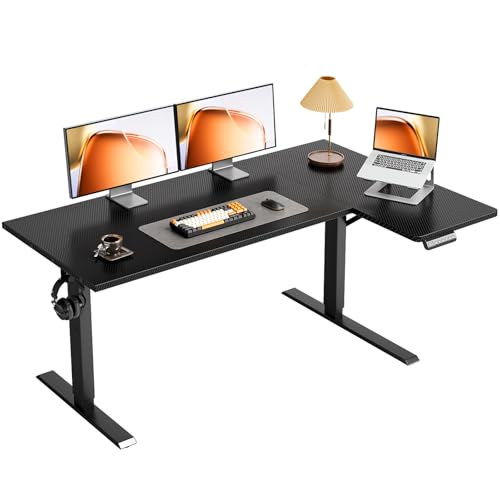 OffiGo 55" Reversible L Shaped Electric Standing |
8.4/10 | Buy | |
| Best Premium |
 SHW 55 x 28 Electric Height Adjustable Standing |
8.4/10 | Buy |
 OffiGo 71" Reversible L Shaped Electric Standing |
8.3/10 | Buy |
Comprehensive Analysis of Standard Desk Dimensions and Ergonomic Adjustability
Standard workstation dimensions dictate daily comfort and long-term spinal health for office workers and remote professionals alike. While most commercial desks share nearly identical vertical measurements, understanding why those standards exist helps workers configure their spaces with greater precision. Evaluating standard dimensions alongside modern ergonomic guidelines reveals whether a conventional fixed desk meets your physical requirements or if an adjustable solution is necessary.
The Standard Industry Baseline: Why 28 to 30 Inches Became the Commercial Norm
The commercial furniture manufacturing sector has historically standardized office desks at a surface height between 28 and 30 inches, with 29 inches representing the most common benchmark. This convention originated in the middle of the twentieth century to streamline mass manufacturing and office planning. During that era, standardized dimensions allowed corporate offices to purchase uniform furniture that fit the average male worker of that generation. Designing for an average height of approximately five feet ten inches enabled manufacturers to produce single-size desks efficiently.
Fixed 29-inch surfaces quickly became the universal default across commercial offices, educational facilities, and residential furniture collections. While this height accommodates standard drawer pedestals and matches conventional office chair adjustment ranges, it represents an arbitrary average rather than an ergonomic ideal. Human bodies feature diverse proportions, varying torso lengths, and distinct leg measurements that rarely match a rigid standard. As computer work replaced manual paperwork and typewriter usage, the biomechanical limitations of standard desk dimensions became increasingly evident.
Biomechanical Consequences: How Fixed Dimensions Impact Neutral Posture
When a desk surface is misaligned with an individual’s natural body geometry, the musculoskeletal system compensates through continuous muscular tension. Seated workers who are shorter than five feet eight inches frequently find that a standard 29-inch desk forces them to elevate their shoulders to place their forearms on the surface. This prolonged shoulder elevation engages the upper trapezius and levator scapulae muscles, resulting in chronic neck stiffness and upper back spasms. Furthermore, reaching upward to access a keyboard leads to backward wrist extension, which elevates internal pressure within the carpal tunnel.
Conversely, taller individuals face distinct physical discomfort when restricted to a traditional fixed surface. Users with longer legs often discover insufficient vertical clearance between the chair seat and the underside of the desktop, preventing them from sliding their thighs under the workspace. To compensate, taller workers often lower their office chairs below an optimal angle or slump forward over the keyboard to rest their forearms. This slouched posture flattens the natural inward curve of the lumbar spine, placing excessive compression on the intervertebral discs.
Calculating Your Ideal Seated Height: The 90-Degree Elbow Formula
Determining your precise ergonomic seated height begins with establishing proper lower-body alignment before setting the desk surface. Begin by adjusting your office chair so that your feet rest completely flat on the floor with your knees bent at approximately a ninety-degree angle. Your thighs should remain parallel to the floor, and the front edge of the seat cushion should not apply pressure behind your knees. Once your lower body is positioned correctly, let your upper arms hang loosely alongside your torso with your shoulders fully relaxed.
Bend your elbows to roughly ninety degrees so your forearms extend straight forward, parallel to the ground. Measure the distance from the finished floor directly to the underside of your forearms and elbows. This vertical measurement represents your ideal working surface height for typing and mouse navigation. For a person standing five feet four inches tall, this measurement is typically around 24 to 25 inches, whereas a person standing six feet tall requires a height closer to 28 to 29 inches.
Determining Standing Desk Height: Neutral Alignment Across the Full Range
Calculating optimal standing desk elevation follows a similar biomechanical principle centered on neutral joint angles and spinal alignment. When standing upright, distribute your weight evenly across both feet with a slight, unlocked bend in your knees to prevent joint strain. Keep your pelvis in a neutral position, avoid arching your lower back, and allow your shoulders to drop naturally away from your ears. Your elbows should bend at an angle between ninety and one hundred degrees, creating an open, relaxed posture for keyboard use.
Measure the vertical distance from the floor to the base of your elbows while holding this upright, neutral stance. The top of your standing desk surface should align evenly with this measured point so your forearms rest comfortably without reaching upward or hunching downward. If your standing surface is adjusted even two inches too high, your shoulders will instinctively shrug, causing tension along the cervical spine. Conversely, setting the desk too low encourages leaning on the desktop, shifting weight onto your wrists and fatiguing the lower back.
Real-World Variables: Footwear, Anti-Fatigue Mats, and Desktop Thickness
Accurate workstation measurements must also account for everyday variables that alter your working elevation. Footwear is a primary factor, as running shoes, boots, or supportive office footwear can add anywhere from 0.75 inches to 1.5 inches to your standing height compared to bare feet. If you alternate between working in socks and wearing structured shoes, your standing surface will require slight recalibration to maintain neutral forearm alignment.
Anti-fatigue standing mats introduce another essential measurement variable for daily sit-stand workstation users. High-density polyurethane foam mats typically feature a profile thickness ranging between 0.5 inches and 1 inch. While these mats compress under body weight, they still raise your standing base, requiring your desk to elevate slightly higher to preserve optimal elbow angles. Additionally, the thickness of your desktop surface, which typically ranges from 0.6 inches on compact engineered boards to 1.5 inches on solid butcher blocks, must be included when measuring total floor-to-surface elevation.
Height Adjustment Ranges in Motorized Frames: Practical Specifications
Because static desks fail to accommodate individual ergonomic requirements, electric motorized frames have become an indispensable workstation standard. Modern adjustable desks allow users to modify surface heights smoothly, catering to both seated and standing postures across a wide demographic spectrum. Many entry-level and mid-range electric desks utilize two-stage telescoping leg columns that provide an adjustment stroke capable of serving common working heights. Analyzing manufacturer specifications reveals the exact vertical parameters supported by these lifting mechanisms.
Popular standard models, such as the HUANUO Electric Standing Desk and the Monomi 48-inch model, offer a motorized vertical travel range between 28.35 inches and 46.46 inches. Similarly, compact options like the YOLEZO 35-inch frame adjust from 28.3 inches to 46.5 inches, while the SHW 55-inch workstation travels between 28 inches and 45 inches. For users seeking expanded reach, reversible corner frames such as the OffiGo 55-inch and 71-inch models extend from 28.4 inches up to 47.2 inches. When browsing electric standing desk frames, comparing these lower and upper travel boundaries is crucial to confirm that the frame accommodates your physical height.
These lifting systems are typically driven by quiet motorized mechanisms operating below 45 to 50 decibels, enabling smooth height transitions without disturbing household members or colleagues. Integrated digital handsets with programmable memory presets allow users to store their exact seated and standing heights. With three or four memory buttons available on models like the HUANUO, YOLEZO, and OffiGo desks, switching between precise ergonomic settings requires only a single button press. This automation eliminates the guesswork of manual alignment and encourages consistent postural variation.
Ergonomic Adaptations for Shorter Users: Mitigating High Minimum Clearances
A notable challenge with standard two-stage motorized frames is their lower adjustment boundary, which typically bottoms out around 28 inches. For individuals under five feet four inches tall whose ideal seated elbow height is 24 to 26 inches, a 28-inch minimum remains too high for neutral sitting. Shorter users who place their feet on the floor while seated at these frames will still experience elevated shoulder posture and wrist strain. Fortunately, straightforward ergonomic adaptations can bridge this dimensional gap effectively.
The most practical solution involves raising your office chair until your elbows rest comfortably at the 28-inch desktop level. Because this elevates your feet off the floor, you must position an adjustable ergonomic footrest underneath the desk to support your feet. A sturdy footrest preserves a ninety-degree knee bend, supports your thighs evenly, and eliminates pressure along the back of the legs. Alternatively, mounting an under-desk keyboard tray beneath the surface drops your typing plane by two to three inches, bringing input devices directly into your ideal ergonomic zone.
Considerations for Tall Professionals: Maximum Elevation and Structural Rigidity
Professionals standing over six feet two inches face the opposite challenge, requiring sufficient vertical extension at standing height without sacrificing structural stability. A user who is six feet four inches tall typically requires a standing surface elevation between 46 and 48 inches. While frames that extend to 46.5 or 47.2 inches accommodate taller individuals, operating near maximum height highlights the importance of frame engineering and joint rigidity.
As telescoping leg columns extend toward their upper limits, the overlapping steel sleeve area within the legs diminishes. This reduced column overlap can make desks vulnerable to lateral sway, front-to-back deflection, and monitor wobble during vigorous typing. Workstations built with thickened alloy steel frames, fixed crossbeams, and diagonal bracing, such as those featured in the OffiGo L-shaped series, maintain structural stability at full extension. Ensuring rigid frame architecture guarantees that your monitors and peripherals remain steady throughout your standing work sessions.
Display Elevation and Focal Alignment: Coordinating Desk and Monitor Height
Achieving proper working surface elevation resolves only half of the ergonomic equation, as monitor positioning directly influences head and neck alignment. Placing a computer screen flat on a 29-inch desk inevitably forces users to tilt their heads downward, creating significant cervical spine strain. Over extended work sessions, this downward gaze contributes to upper neck soreness and rounded shoulder posture. Coordinating desk height with proper display elevation is vital for comprehensive physical comfort.
The top third or upper edge of your computer monitor screen should align directly with your horizontal eye level when looking straight ahead. Your viewing distance should span approximately 20 to 30 inches from your eyes, roughly equivalent to an extended arm’s length. Utilizing an adjustable monitor arm or a sturdy monitor riser allows you to decouple your screen height from your keyboard surface. This independent elevation ensures that your neck remains neutral while your forearms rest comfortably on the desk.
Workstation Architecture: Surface Area, Load Ratings, and Stability
Selecting an appropriate workstation configuration involves balancing physical dimensions with equipment payload capacity and available room space. Standard compact desks, such as 35-inch or 48-inch rectangular surfaces, fit comfortably into tight apartments and alcoves while accommodating a laptop or single monitor setup. In contrast, extensive multi-monitor arrangements, studio hardware, and desktop PC towers demand larger work areas and higher lifting capabilities. Modern height-adjustable sit-stand workstations provide diverse geometric configurations to suit varied home office layouts.
Load capacity ratings reflect the structural durability of the lifting system under daily operational demands. Compact models like the YOLEZO support up to 154 pounds, while full-size rectangular options like the HUANUO and Monomi frames provide 176 and 178 pounds of lifting capacity, respectively. Meanwhile, specialized workstations like the SHW 55-inch desk feature integrated organization drawers, cable grommets, and wrist-supporting curved edges with a 110.2-pound capacity. Matching your hardware payload to the manufacturer’s rated capacity prevents motor strain and ensures consistent lifting performance.
For professionals managing complex setups, reversible L-shaped frames like the 55-inch and 71-inch OffiGo models provide expansive surface space for zoned productivity. These corner configurations naturally separate computing zones from writing or review areas while maximizing corner room efficiency. Equipped with fixed crossbeams and over-beam supports, reinforced L-shaped frames offer reliable stability across broad surfaces. Choosing the appropriate footprint ensures that your workspace supports all essential equipment without cluttering your physical environment.
Practical Workstation Optimization: Establishing a Sustainable Routine
Adopting an active sit-stand routine requires thoughtful integration of ergonomic height principles into your daily work habits. Ergonomists frequently suggest following the twenty-eight-two routine, which consists of twenty minutes of seated work, eight minutes of standing, and two minutes of moving or stretching. Alternating your posture throughout the day stimulates circulation, relieves static spinal loading, and combats afternoon fatigue. Programming your ideal seated and standing elevations into digital memory presets simplifies this transition into an effortless habit.
Before finalizing your workspace configuration, verify that all power cords, display cables, and peripheral leads possess sufficient slack across the entire height adjustment range. Snagged cables can dislodge equipment or trigger anti-collision safety sensors during vertical movement. Regularly inspect your posture, ensuring that your elbows remain relaxed at ninety degrees and your gaze stays level with your display. By aligning your desk elevation with your individual body proportions, you establish a comfortable, durable, and highly productive workstation foundation.
About the author
Camryn Rabideau is a freelance writer and product reviewer with a background in product design and journalism. Since becoming a full-time freelance writer in 2016, she has developed extensive experience researching and testing consumer products for the home. Her work focuses on practical product performance, usability, and purchasing considerations. Her combination of product design knowledge and hands-on testing experience provides a useful perspective on furniture, household products, and everyday living.