
How to Raise Desk Height: Practical Guide for 2026
Learn how to raise desk height using ergonomic converters and risers in November 2026 to relieve neck strain, support neutral posture, and work comfortably.
 By Anthony Spadafora
Updated November 6, 2026

Persistent neck stiffness, rounded shoulders, and upper back discomfort often stem from working at a fixed surface that sits too low for your natural posture. Standard commercial office desks typically stand at a uniform height of 29 to 30 inches, which rarely fits individuals outside a narrow height profile. Learning how to raise desk height allows you to establish a neutral working posture where your forearms rest parallel to the floor and your cervical spine stays upright. Whether you want to adapt an existing tabletop or transition to active standing, several practical methods can elevate your workspace without requiring an entirely new furniture setup. If you are reviewing your space, our ergonomic home office desk guide highlights foundational layout strategies for productive rooms.
Finding the right elevation approach depends on whether you need a permanent modest lift or the flexibility to alternate between seated and upright positions throughout the day. Desktop converters from brands like VIVO, TechOrbits, and JYLH JOYSEEKER offer on-demand elevation through pneumatic gas springs and mechanical scissor frames. Alternatively, structural leg extenders and dedicated adjustable frames provide static elevation directly at the base of the furniture. Understanding the mechanical differences and weight ratings behind each method ensures your monitors, laptop, and keyboard remain stable while you work. By matching your elevation technique to your daily workflow, you can prevent fatigue, reduce repetitive strain, and create a healthier everyday work environment.
| Award | Product | HOF Score About HOF ScoreThe HOF Score is our own rating from 0 to 10, based on performance, design and build, ease of use, and value. It reflects independent research and is never influenced by manufacturers, retailers, or affiliate commissions. Learn more › | |
|---|---|---|---|
| Best Overall |
 JYLH JOYSEEKER 32" Standing Desk Converter |
9.2/10 | Buy |
| Best Premium |
 VIVO Black 36 in Standing Desk Converter |
9.1/10 | Buy |
| Best Budget |
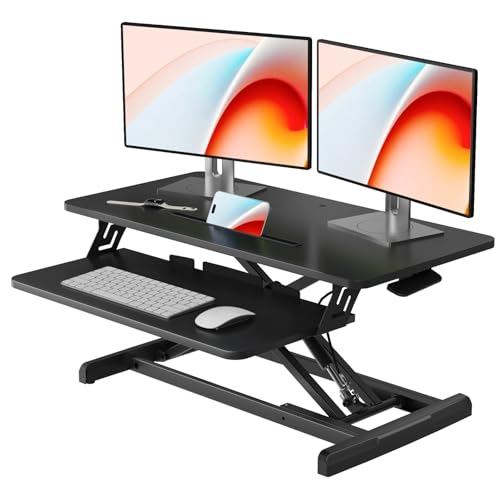 JOY worker Standing Desk Converter |
8.8/10 | Buy |
 VIVO Black 26 in Single Top Standing Desk |
8.6/10 | Buy | |
 TechOrbits Black 32 in Standing Desk Converter |
8.6/10 | Buy | |
 FLEXISPOT Standing Desk Converter, 36", Black |
8.0/10 | Buy |
Practical Methods to Raise Your Desk Height for Better Ergonomics
Elevating an office workstation requires a clear understanding of your physical posture, your available space, and the gear resting on your tabletop. Whether you want to stand during afternoon meetings or simply need two extra inches to clear your thighs while seated, matching the solution to your daily routine prevents discomfort and equipment damage. Several dependable techniques allow you to achieve an ergonomic working posture without requiring specialized carpentry skills. Exploring these mechanical options will help you determine the safest and most efficient path for your daily setup.
Calculating Your Ideal Seated and Standing Elbow Heights
Ergonomic alignment starts with the relationship between your upper arms and your working surface. When you sit or stand upright with your shoulders relaxed, your forearms should form an angle between 90 and 100 degrees relative to your torso. In this neutral position, your wrists remain straight while typing, which minimizes tension along the carpal tunnel and forearm flexor muscles. If your tabletop sits even one inch too low, your shoulders will instinctively roll forward to compensate, creating chronic strain across your neck and upper back.
To calculate your target surface height, measure the vertical distance from the floor to the underside of your elbow while maintaining your preferred working posture. If you are configuring a standing setup, make sure to take this measurement while wearing the footwear you normally use during the workday. Anti-fatigue floor mats also add between half an inch and one full inch of height, so stand directly on your mat when measuring. The top third of your computer screen should also align with your resting eye level, ensuring that your cervical spine remains completely neutral while viewing documents.
Elevating Workstations with Desktop Standing Desk Converters
Desktop standing desk converters represent the fastest and most flexible way to elevate a standard sitting desk. These self-contained units rest directly on top of your existing furniture and raise your monitors, keyboard, and mouse through integrated mechanical linkages. Manufacturers like VIVO, TechOrbits, and JYLH JOYSEEKER design these converters to deliver smooth vertical travel without requiring any structural modifications to your existing furniture. Because they simply sit on your desktop, they are ideal for rental apartments, corporate cubicles, and antique wooden tables.
Lifting mechanisms on modern desktop converters rely primarily on pneumatic gas springs or heavy-duty steel wire springs. Pneumatic cylinders, such as those found on the VIVO DESK-V000V and JYLH JOYSEEKER models, utilize compressed gas to counterbalance the weight of your equipment, allowing you to lift or lower the platform by squeezing a release handle. In contrast, mechanical steel spring systems, like the lift design on the FLEXISPOT 36-inch converter, avoid fluid seals entirely to prevent gas leakage over years of heavy daily use. Both mechanisms provide controlled, straight up-and-down movement that prevents your gear from shifting forward during transit.
Choosing between a single-tier surface and a dual-tier workstation depends on how you interact with your peripherals. Single-top risers, like the VIVO DESK-V001J, offer a compact footprint measuring around 26 inches wide that works well in tight cubicles or for minimalist laptop setups. Dual-tier units provide an expansive upper deck for dual monitors alongside a lower keyboard tray that drops several inches below the main surface. Top tiers typically hold between 17.6 and 33 pounds of hardware, while lower keyboard decks safely support up to 4.4 pounds for keyboards and mice.
Using Heavy-Duty Furniture Leg Risers on Stationary Desks
If you only need to raise your desk by a static two to six inches for improved seated clearance, heavy-duty leg risers offer an affordable and sturdy solution. These modular pedestals slip directly underneath each desk leg, raising the entire frame uniformly off the floor. They are particularly beneficial for taller individuals whose knees or armrests bump against the underside of standard 29-inch office desks. Installing risers creates immediate thigh clearance and allows you to slide your office chair in closer to your keyboard.
Material integrity and leg geometry are paramount when selecting risers to support a full computer desk setup. Solid hardwood blocks and reinforced high-impact composite risers provide the compression strength needed to hold heavy desks laden with multiple monitors and computer towers. Traditional four-post desks with square or round wooden legs seat securely into standard square recessed pockets with non-slip rubber bottoms. In contrast, modern steel office desks with flat sled bases, T-frames, or C-frames require wide continuous platform supports rather than individual corner blocks to prevent tipping hazards.
Swapping Static Legs for an Adjustable Sit-Stand Frame
When you love your existing desktop surface but need full sit-to-stand versatility, swapping the base for an adjustable frame is an exceptional long-term upgrade. Many solid wood, butcher block, and laminate tabletops can be unscrewed from static legs and mounted directly onto an aftermarket height-adjustable steel chassis. This approach allows you to preserve a premium desktop aesthetic while gaining motorized or manual elevation capabilities. If you want to explore complete workstation transformations, our standing workstation overview details how dynamic bases function in modern work environments.
Motorized frames generally utilize single-motor drive shafts or dual synchronized motors housed inside telescoping steel lifting columns. Dual-motor systems distribute mechanical force evenly across both legs, resulting in quieter vertical transit and higher lifting capacities for multi-monitor setups. When mounting an existing desktop to a new frame, solid hardwood and dense plywood accept direct coarse-thread wood screws or threaded brass inserts securely without stripping. Hollow-core honeycomb doors and thin paper-filled composite panels lack the internal density required to hold mounting screws safely, so always verify your tabletop core material before drilling.
Fine-Tuning Monitor and Keyboard Interface Heights
Raising your desk height does not always mean physically moving the furniture itself. In many home offices, optimizing the height of your individual input devices and screens delivers the exact ergonomic relief you need. Adjustable articulating monitor arms allow you to float your screens anywhere from three inches to nearly twenty inches above the desktop plane. This independent vertical control lets you fine-tune display angles without raising the furniture beneath your arms, preventing forward head tilt and eye fatigue.
Under-desk keyboard trays represent another practical way to correct working interface heights. Clamp-on or track-mounted keyboard trays attach beneath the tabletop, allowing you to position your typing surface at genuine elbow level even if the main desk stands too high. Some heavy-duty keyboard platforms feature positive and negative tilt adjustments that keep your wrists in an optimal neutral plane during typing marathons. By bringing the keyboard to your lap level, you eliminate shoulder shrugging and neck tension without altering the physical desk legs.
Maintaining Workstation Stability and Managing Load Limits
Elevating any desk naturally raises its center of gravity, which can amplify keyboard bounce and monitor sway during active typing. Desktop converters with wide X-shaped steel frames, such as the JOY worker 32-inch riser, help manage this balance by keeping the lifting force centered over the base footprint. However, placing heavy multi-monitor mounts toward the extreme rear edge of a converter platform can create forward or backward leverage. Distributing your hardware weight evenly across the main surface prevents unwanted wobbling and ensures smooth pneumatic lifting throughout daily adjustments.
Floor surfaces and frame hardware play major roles in how sturdy a raised workstation feels during daily use. Hardwood, tile, and commercial low-pile carpets offer solid foundations, whereas plush residential carpets compress unevenly under heavy furniture legs. Adjusting the threaded leveling glides beneath your desk feet helps eliminate wobble by creating firm, even contact across all corners. In addition, checking the tightness of frame bolts, keyboard tray brackets, and monitor clamp screws every few months keeps your setup secure, quiet, and free from distracting mechanical play.
Cable Slack Management and Dynamic Travel Routing
Raising a workstation introduces vertical travel that can stretch, pinch, or unplug connected power cords and display cables. When your equipment sits on an elevated converter or motorized frame, every cord must have sufficient length to travel from the wall outlet to the top surface without pulling taut. Tight cords risk damaging delicate display ports, snapping power plugs, or dragging expensive electronics off the desk during upward transit. Planning your cable paths carefully ensures safe, seamless elevation without placing mechanical tension on delicate connectors.
Mounting a surge protector directly to the underside of the moving desktop or converter platform solves most wire length complications. When your power strip moves in unison with your monitors and computer, your display and peripheral cords maintain a constant, static length. When you are assembling an elevated workstation, reviewing quick-assembly desk solutions provides helpful perspective on organizing integrated wire channels effectively. Always run your elevated setup through a complete test cycle while watching the cable bundle closely to verify that no wire pinches inside scissor hinges.
Building an Active Sit-Stand Routine for Daily Comfort
Learning how to raise desk height is only the first step toward building a healthy, energizing home office workflow. Standing statically for eight consecutive hours places excessive pressure on your feet, knees, and lumbar spine, which can cause just as much fatigue as prolonged sitting. The key to sustainable ergonomics lies in active movement and frequent postural transitions throughout your shift. Alternating between seated focus and upright engagement keeps your circulation active without overloading your lower joints during demanding workdays.
Many ergonomic professionals suggest following the Cornell 20-8-2 routine as a balanced baseline for daily desk work. Under this guideline, you sit in a supported ergonomic chair for 20 minutes, stand at your elevated desk for 8 minutes, and spend 2 minutes moving or stretching. Pairing this cadence with an anti-fatigue mat helps relieve pressure along the soles of your feet and encourages subtle calf muscle contractions while you stand. Wearing supportive footwear further cushions your joints, helping you maintain energy, comfort, and focus through every afternoon slump.
Workstation Ergonomics and Alignment Verification
Before settling into your updated workstation, take a few minutes to run through a complete physical alignment check. Position your office chair so your feet rest completely flat on the floor with your knees bent at a comfortable 90-degree angle. Next, adjust your newly raised desk surface or converter tray until your elbows rest directly at the level of your home keyboard row without hiking your shoulders. Finally, verify that your computer screen sits approximately an arm length away with the top of the glass meeting your resting eye line.
Testing your setup across both seated and standing modes confirms that your mechanical adjustments deliver reliable comfort in every configuration. Make sure that all release levers lock firmly into position and that the platform remains rock-solid while you type briskly on the keyboard. If you notice any wrist bending or neck tilting, make slight micro-adjustments to your monitor arms or keyboard tray angle until your body feels completely balanced. Taking the time to dial in these final measurements ensures your elevated desk delivers lasting ergonomic benefits every single day.
About the author
Anthony Spadafora is an experienced technology journalist and home office furniture reviewer specializing in ergonomic office chairs, standing desks, and workspace accessories. Having worked remotely since 2018, he brings extensive hands-on experience to evaluating furniture for modern home offices. His reviews explore comfort, adjustability, build quality, cable management, and practical workspace improvements, helping readers understand the features that matter when investing in a home office setup.